
deps - Dependency Graph
The deps command generates visual dependency graphs for your .NET solutions and projects. You can output in multiple formats: interactive dynamic HTML, Mermaid markdown, plain HTML, or SVG images. This helps you understand project relationships, identify coupling, and document your architecture.
nmbl deps <ProjectOrSolution> [options]
ProjectOrSolution- Path to a.csprojor.slnxfile, or a directory containing a single.slnxfile.
--output <path>,-o <path>- Output file path. The format is inferred from the file extension when--formatis omitted.--format <fmt>,-f <fmt>- Override output format:md,mermaid,html,svg,dynamic-svg.--include-nuget,-n- Include NuGet package nodes (name only).--include-nuget-versions- Include NuGet package nodes with version numbers. Implies--include-nuget.--include-project-versions- Annotate project nodes with their version strings (SVG and dynamic HTML only).--highlight <pattern:color>- Highlight projects matching the pattern with a fill color. Format:pattern:fillColororpattern:fillColor:strokeColor. First matching rule wins. May be repeated.--color-by-module,-m- Auto-color projects by their<Module>element (or.nmblmodule definitions). Each unique module gets a distinct color. See Module Configuration.--module-boxes- Group projects by module into labeled boxes (SVG and dynamic HTML only). Automatically enables--color-by-module. See Module Configuration.--with-legend- Show a module color legend (requires--color-by-moduleor--module-boxes). See Module Configuration.--module <name>- Show only projects with the specified<Module>value, plus their direct external dependencies. Requires a.slnxfile. See Module Configuration.--all-modules <folder>- Generate adynamic.htmldependency graph for every module in the solution, plus anindex.htmltable of contents. Requires a.slnxfile. See Module Configuration.--exclude <patterns>,-e <patterns>- Comma-separated substrings; projects whose name contains any pattern are excluded (case-insensitive). May be repeated. See Filtering & Highlighting.--hide <pattern>- Remove or mask text in project display names (case-sensitive). Usepatternto remove, orpattern:*to mask with***. May be repeated. See Filtering & Highlighting.--graph-format <layout>,-gf <layout>- Graph layout fordynamic-svgoutput.wheel(default) renders projects in a circular chord/dependency wheel;boxesuses the MSAGL layered box layout. See Wheel Layout.
The output format is automatically determined by the file extension (or override with --format):
| Extension | Format | Description |
|---|---|---|
.dynamic.html |
dynamic-svg |
Recommended. Interactive HTML + SVG with hover highlighting |
.html |
html |
Interactive HTML with Mermaid pan/zoom |
.svg |
svg |
Static SVG image (MSAGL layout) |
.mermaid |
mermaid |
Raw Mermaid diagram text |
.md |
md |
Mermaid in a fenced code block (default) |
See Output Formats for full details on each format.
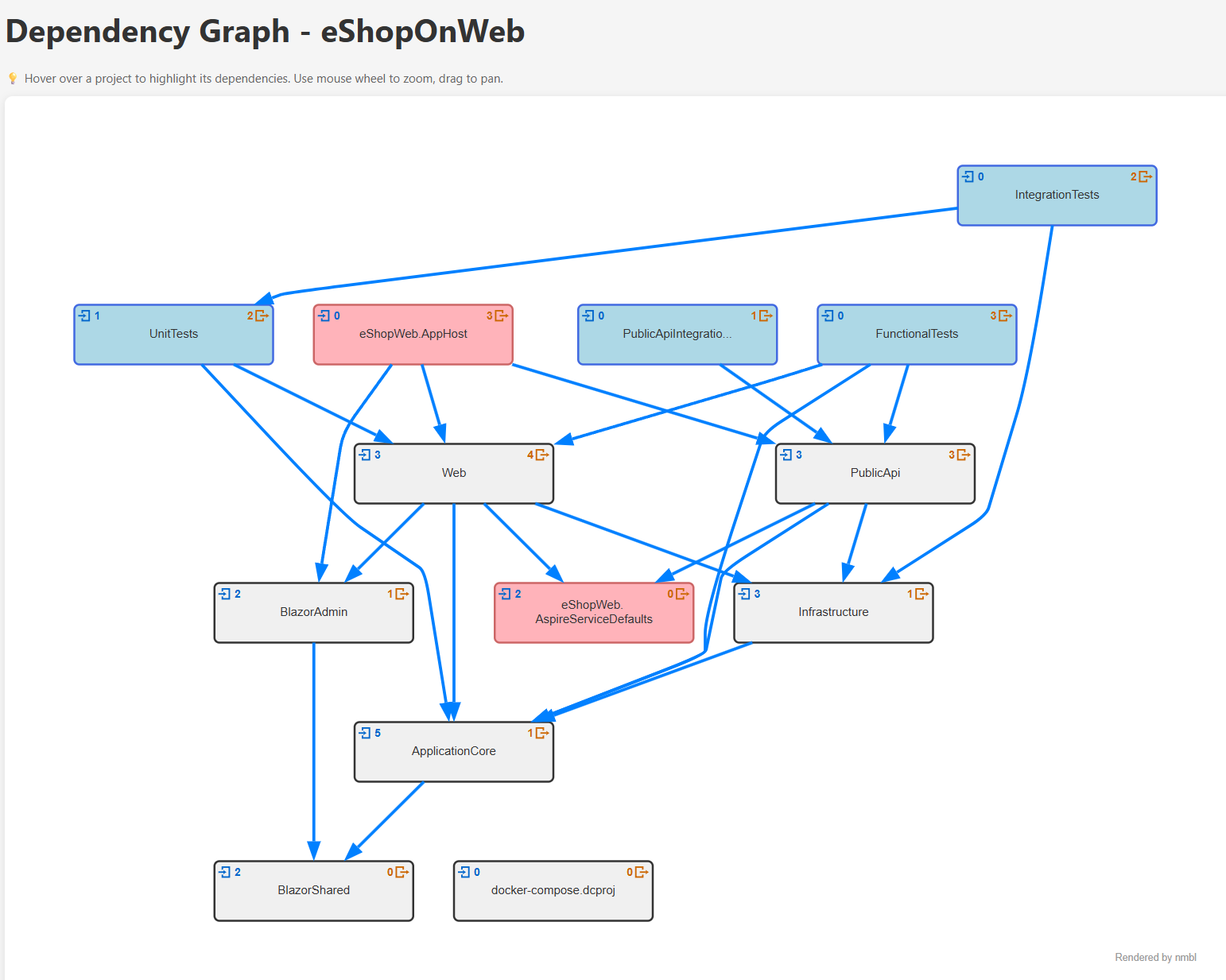
Here’s an interactive dependency graph generated from the eShopOnWeb reference application:
Generated with:
nmbl deps .\eShopOnWeb.slnx -o dependencies.dynamic.html --highlight test:lightblue
Here’s a live module index generated from the RiverBooks solution using --all-modules to write an index.html table of contents plus one interactive *.dynamic.html diagram per module into a folder:
Open the RiverBooks module diagrams
See the RiverBooks architecture docs page that incorporates these module diagrams
Generated with:
nmbl deps .\RiverBooks.slnx --all-modules .\docs\diagrams\modules
nmbl deps MySolution.slnx --output deps.md
Creates a Mermaid diagram that can be viewed in GitHub README files or documentation.
nmbl deps MyProject.csproj --output deps.html
Creates an HTML file with an interactive, zoomable dependency graph.
nmbl deps MySolution.slnx --output deps.dynamic.html
Creates a self-contained interactive HTML file where you can hover over nodes to highlight dependencies. This is the recommended default format.
nmbl deps MySolution.slnx --output deps.svg
Creates a static SVG image suitable for embedding in presentations or tools that do not support HTML.
nmbl deps MyProject.csproj --include-nuget --output deps.dynamic.html
Shows both project dependencies and NuGet package dependencies.
nmbl deps MySolution.slnx --include-nuget-versions --output deps.dynamic.html
Shows NuGet packages with their version numbers for detailed dependency analysis.
nmbl deps MySolution.slnx --exclude Tests --output deps.dynamic.html
Excludes any project whose name contains Tests (case-insensitive). Useful for focusing on production code.
nmbl deps MySolution.slnx --exclude Tests,Fakes --output deps.dynamic.html
Excludes projects matching any of the comma-separated patterns.
See Filtering & Highlighting for full details.
nmbl deps . --highlight "Core:lightgreen" --highlight "Tests:gray" --output deps.dynamic.html
Applies custom fill colors to matching projects. First matching rule wins.
See Filtering & Highlighting for full details.
nmbl deps MySolution.slnx --color-by-module --output deps.dynamic.html
Auto-colors projects by their <Module> element value (or .nmbl module definitions). Each unique module gets a distinct color.
See Module Configuration for how to define modules.
nmbl deps MySolution.slnx --module Users --output users-module.dynamic.html
Shows only projects in the Users module plus their direct external dependencies.
nmbl deps MySolution.slnx --all-modules ./docs/modules
Generates a dynamic.html dependency graph for every module in the solution plus an index.html table of contents.
See Module Configuration for full details.
nmbl deps MySolution.slnx --hide Acme --output deps.dynamic.html
Removes Acme from project names (e.g., Acme.Web becomes Web). Useful for sharing diagrams without exposing company/product names.
nmbl deps MySolution.slnx --hide "Acme:*" --output deps.dynamic.html
Masks Acme with *** instead of removing it (e.g., Acme.Web becomes ***.Web).
See Filtering & Highlighting for full details.
nmbl deps MySolution.slnx --output deps.dynamic.html --graph-format boxes
Switches to the MSAGL layered box layout instead of the default dependency wheel.
nmbl deps MySolution.slnx --output deps.dynamic.html --graph-format wheel
Explicitly requests the chord/dependency wheel layout (the default). Projects are arranged in a circle; Bezier curves through the center show dependency direction.
# Generate all formats for the same solution
nmbl deps MySolution.slnx --output deps.md
nmbl deps MySolution.slnx --output deps.html
nmbl deps MySolution.slnx --output deps.svg
nmbl deps MySolution.slnx --output deps.dynamic.html
Creates multiple formats for different use cases.
nmbl deps MySolution.slnx --output docs/architecture/dependencies.dynamic.html
Generate dependency diagrams for your architecture documentation.
nmbl deps MySolution.slnx --include-nuget --output review.dynamic.html
Create interactive graphs to help reviewers understand changes.
# Generate before making changes
nmbl deps MySolution.slnx --output before.dynamic.html

# Make architectural changes

# Generate after changes
nmbl deps MySolution.slnx --output after.dynamic.html

# Compare the two diagrams
- Output Formats — full breakdown of every format with capabilities table
- Module Configuration — how to use
<Module>in csproj files and the.nmblsettings file - Filtering & Highlighting —
--exclude,--highlight, and--hidewith full examples
projectreferences- List project referencesloc- Count lines of code